¶ Lighting Design Is Known
Where the lighting design is known a similar approach is taken but additional information is required.
¶ Substantiating evidence required
The lighting design for a dwelling should include the following information:
- Lighting Plan: drawings for the dwelling indicating the location of all fixed light fittings.
- Lighting Schedule: this should document the bulb used in each of the fixed light fittings identified in the Lighting Plan.
- Supporting technical documentation: non-default data can only be used where there is supporting documentation indicating the Bulb Power (in Watts) and Bulb Efficiency (in Lumens /Watt). Documentation for bulb efficiency should meet the normal requirements of DEAP, i.e. it should be either:
- Manufacturer’s documentation with a CE-marking and stating a relevant test standard, or,
- Accredited test data, as defined in the DEAP Manual, referencing the relevant EN standards.
- The above documentation should be signed-off by the Architect, Engineer, or Assigned Certifier.
In a New Final BER survey, if it is clear that the information provided in the Lighting Design does not match the installed lighting, then for the purposes of the BER the lighting design is not known and the guidance in Section 2.1 should be followed.
For example, in all of the following cases, the lighting design is considered to be invalid and default data should be used as per Section 2.1:
- The number of fixed light fittings specified in the lighting design is different from the number identified in the survey;
- Some of the fixed light fittings do not have bulbs installed;
- One or more of the bulbs does not match the lighting design, e.g. what was specified as CFL actually has an LED.
¶ Entry into DEAP 4.2
In the Lighting page of DEAP, “Is lighting design known?” is selected.

As before, to add a bulb select the “Add Bulb” option on the right hand side of the page.
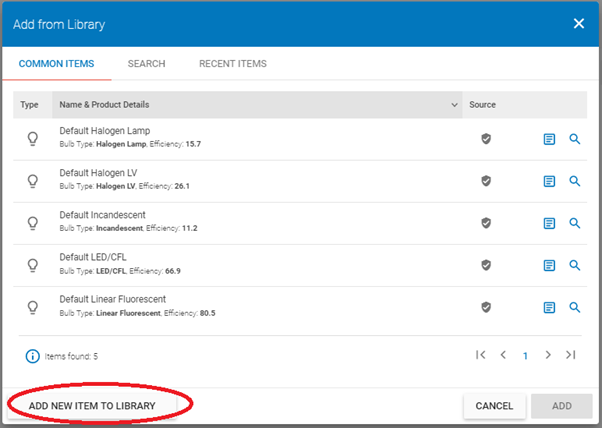
Click “Add New Item to Library” to add a new bulb and then enter the data for the light bulb.
If you have previously added a bulb to the library, you will not have to add it again – you can just search for it in the Search tab. But, for the purposes of this exercise we will go through how to add a new bulb to the Library.
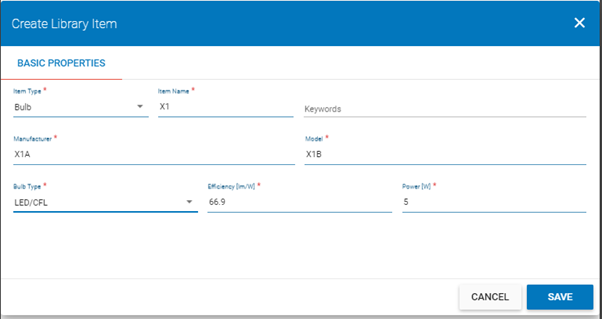
In order to add a bulb with non-default data you will need to specify,
- Bulb Efficiency (in lumens/Watt)
- Bulb Power (in Watts),
based on data from an appropriate source, as described in Section 3.2.
Click “Save” and then “Add Selected Item” to add this bulb to the dwelling.
As before, by default the bulb is added with a Bulb Count = 1.
If the number of these bulbs is not equal to 1 then this must be changed. To do this, click on the item to open the “Edit Bulb” page where you can change the number of bulbs.